
TSM Tool New Update V2026.06.25-1432
Exynos 2400 Download Mode, World-First Qualcomm EDL Support & 20+ New Samsung Models
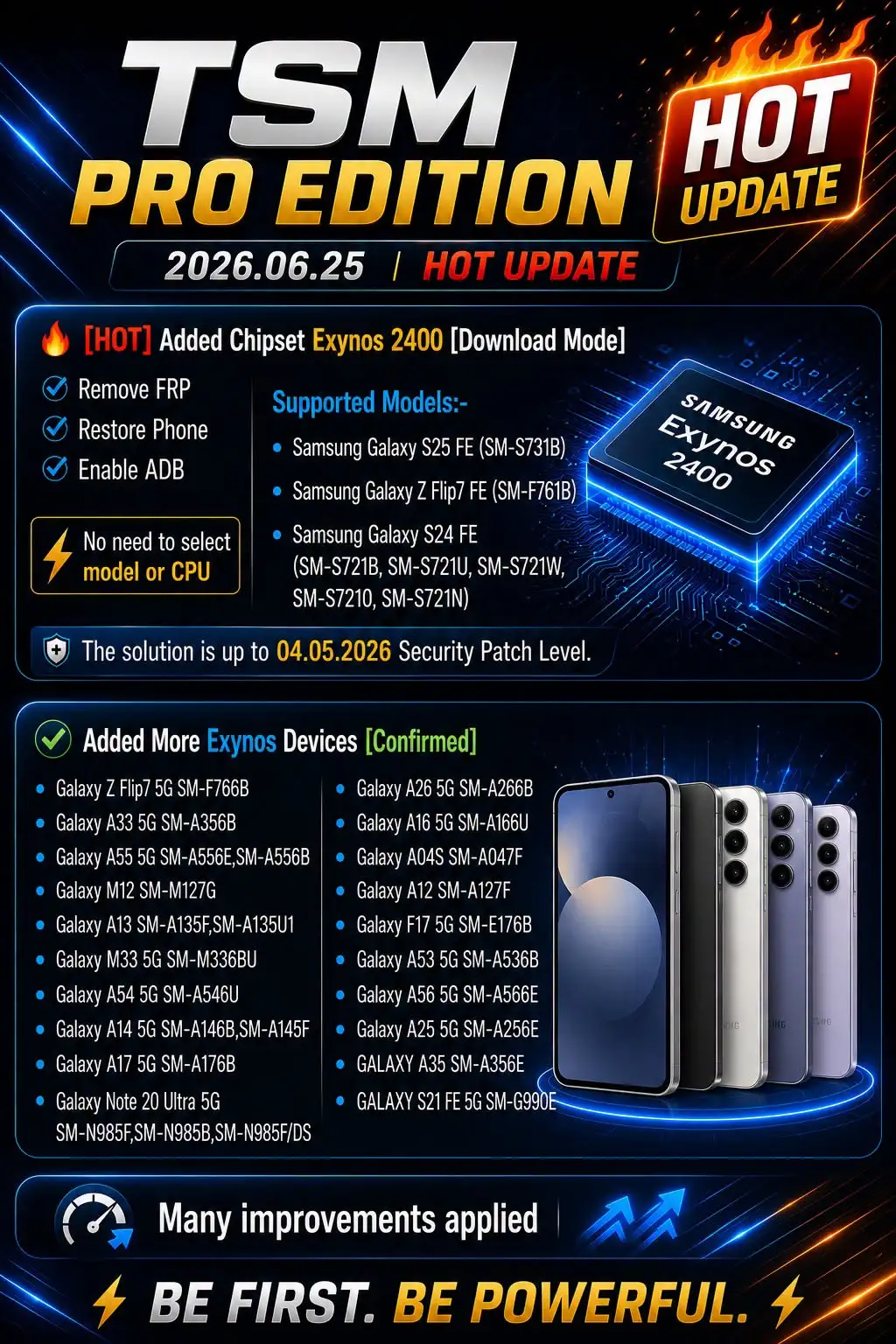
The TSM Tool New Update V2026.06.25-1432 just dropped, and it’s one of the biggest releases in recent memory. Exynos 2400 devices in Download Mode, a world-first Qualcomm EDL mode for select Samsung models, and a huge batch of newly confirmed Exynos devices — all packed into one update. If you run a repair shop or do unlocking work regularly, this one’s going to change your workflow.
This isn’t just a minor patch. The changelog is long, the device list grew by over 20 models, and there are real new capabilities that weren’t possible in previous versions. Let’s break down exactly what’s new, what devices are covered, and how to get everything installed and running.
“Got the update notification this morning and had it running in under 10 minutes. Tested FRP removal on a Galaxy S24 FE right away — done in minutes with no model selection needed. That auto-detect on Exynos 2400 is genuinely impressive. I’ve tried other tools that still make you manually pick the CPU, and it’s a pain. TSM Pro just handles it.”
Marcus D. — Mobile Repair Technician
Houston, TX
🔥 What’s Actually New in TSM Tool New Update V2026.06.25-1432
The headline feature is Exynos 2400 support in Download Mode. That covers FRP removal, phone restore, and ADB enable — and the tool auto-detects the chipset, so you don’t need to manually select a model or CPU. That’s a real time-saver when you’re moving through 10 phones in a day.
But the bigger news for a lot of shops might be the Qualcomm EDL mode support — and TSM is calling this a world first. EDL (Emergency Download Mode) on Qualcomm-based Samsung devices now lets you remove FRP, do factory resets, and even read and write firmware dumps. That’s a completely different class of operation. The supported models include the Galaxy Z Flip5, Z Fold5, S21 FE 5G (both SM-G990B and SM-G990U), and the Galaxy S24 (SM-S921U).
Exynos 2200 support was also added in Download Mode, covering FRP removal, phone restore, and ADB enable — with coverage up to the May 5, 2025 security patch. And for Exynos 2400, the solution runs up to the April 5, 2026 security patch level. Those are current patches, not old firmware. That matters.
And then there’s the expanded device list. Over 20 additional confirmed Exynos devices got added — everything from the Galaxy A12 and A13 to the Galaxy Note 20 Ultra 5G and the new Galaxy A56 5G. I’ll break those down in the device section below.
📋 Full List of Newly Supported Devices
This update adds a lot of devices. The Exynos 2400 chipset section covers some of Samsung’s newest flagships and mid-rangers, while the confirmed Exynos list sweeps up a ton of popular repair-shop regulars. Here’s everything that’s now supported.
Exynos 2400 — Download Mode (FRP, Restore, ADB)
Galaxy S25 FE
SM-S731B
Galaxy Z Flip7 FE
SM-F761B
Galaxy S24 FE
SM-S721B / SM-S721U / SM-S721W / SM-S7210 / SM-S721N
Additional Confirmed Exynos Models
Galaxy Z Flip7 5G
SM-F766B
Galaxy A55 5G
SM-A556E / SM-A556B
Galaxy A54 5G
SM-A546U
Galaxy Note 20 Ultra 5G
SM-N985F / SM-N985B / SM-N985F/DS
Galaxy A56 5G
SM-A566E
Galaxy A35 / A33 5G / A26 5G / A25 5G / A17 5G / A16 5G / A14 5G / A13 / A12 / A04S
Multiple variants
Galaxy M33 5G / M12 / S21 FE 5G / F17 5G / A53 5G
Multiple variants
Qualcomm EDL Mode — World First (FRP, Reset, Read/Write Firmware)
Galaxy A05s / F14 4G / Z Flip5 / Z Fold5
Various bit versions
Galaxy S21 FE 5G (SM-G990B / SM-G990U)
bitK / bitN
Galaxy S24 (SM-S921U)
bit6
Also worth noting — the Lenovo Tab M9 (TB310FU) got added under the broader Android device support. Not Samsung, but good to have if your shop handles tablets.
⚙️ How to Install the TSM Tool New Update V2026.06.25-1432
Installation is pretty painless. You don’t need to uninstall anything first — the installer handles existing versions automatically. That said, run it as administrator or you’ll hit permission errors. I personally prefer to close everything else running before I start — keeps the driver install cleaner.
Download the setup file from your TSM Pro account at tsmtoolpro.com and save it somewhere easy to find.
Right-click the installer and choose “Run as administrator.” Accept the license agreement and click through the setup screens.
Select the installation folder — the default works fine unless you have a specific reason to change it.
Let the installer add the required drivers and create the desktop shortcut. If it asks to close ADB or other running files, let it handle that automatically.
Once complete, open TSM Tool Pro and sign in with your credentials. Choose your brand and model — supported operations will load on the right panel.
What’s the typical install time? Under 5 minutes on most machines — assuming your AV software doesn’t flag the driver package. If it does, add an exception for the TSM installer before running it. Driver signing issues are by far the most common cause of install problems, and they’re always fixable.
📊 Update Summary — Key Features at a Glance
| Feature | Mode | Operations | Patch Level |
|---|---|---|---|
|
Exynos 2400 |
Download Mode | FRP, Restore, ADB (auto-detect) | Up to 04.05.2026 |
|
Exynos 2200 |
Download Mode | FRP, Restore, ADB | Up to 05.05.2025 |
|
Qualcomm (Samsung) |
EDL Mode | FRP, Factory Reset, Read/Write Firmware | Varies by model/bit |
|
20+ Exynos Models |
Download Mode | FRP, Restore, ADB | Confirmed support |
|
Lenovo Tab M9 |
Android | Varies | TB310FU |
✅ Pros & Cons of This Update
✅ What’s Working Well
Auto chipset detection on Exynos 2400 — no manual model selection needed
World-first Qualcomm EDL Mode support — firmware read/write is a game changer
Covers current 2026 security patch levels on Exynos 2400 devices
Massive device list expansion — 20+ confirmed Exynos additions in one update
Clean installer that handles drivers and ADB conflicts automatically
❌ Honest Drawbacks
Qualcomm EDL mode support is limited to specific models and specific bit versions
Devices past the 04.05.2026 patch on Exynos 2400 aren’t covered yet
Requires an active TSM Pro subscription — no free tier for these features
AV software can flag the driver package and block install without a manual exception
❓ Frequently Asked Questions
Does TSM Tool V2026.06.25 support Galaxy S25 FE FRP removal?
What is Qualcomm EDL Mode and why does it matter for Samsung repairs?
How do I know if my Samsung device’s security patch is compatible?
Do I need to uninstall the old TSM Tool version before updating?
Where can I download TSM Tool PRO with the new 2026 update?
Final Thoughts
The TSM Tool New Update V2026.06.25-1432 isn’t a routine patch — it’s a significant capability jump. Exynos 2400 auto-detection in Download Mode cuts time per device, the 20+ newly confirmed Exynos models mean you’re covered on way more jobs, and the Qualcomm EDL mode support opens up operations that weren’t possible before. That read/write firmware access alone is worth paying attention to. If you’re doing volume Samsung work, this update pays for itself fast. Grab the latest version from tsmtoolpro.com and get it running in your shop today.