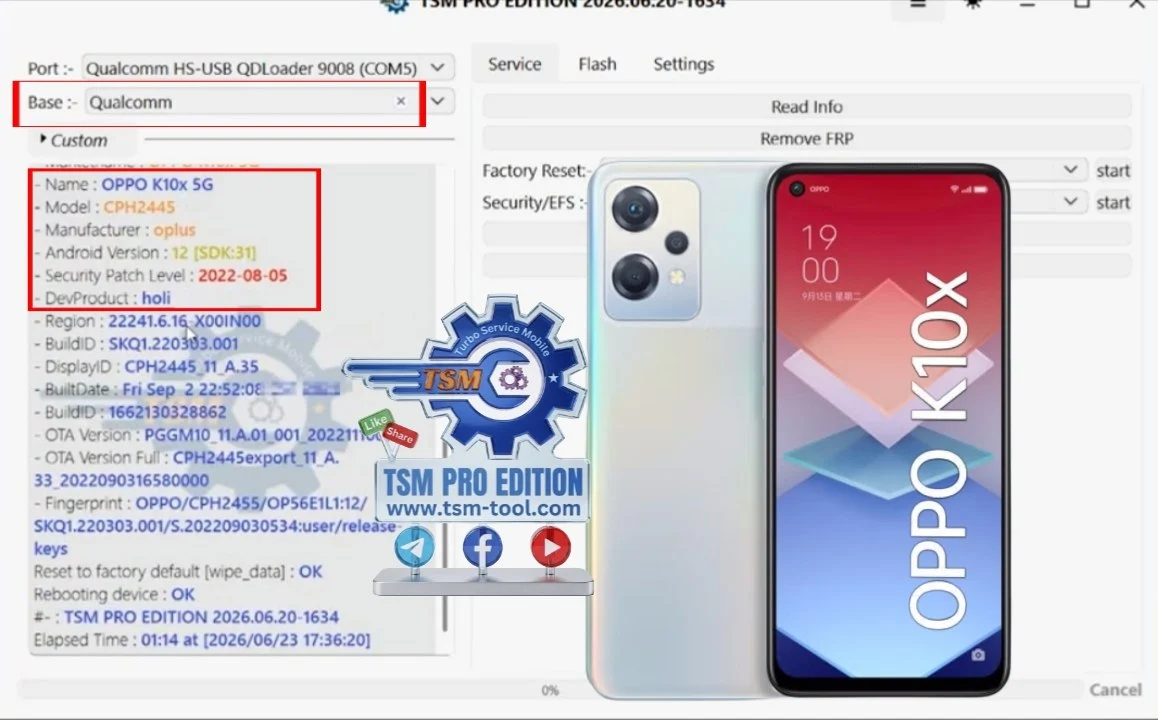
Oppo K10x 5G (CPH2445) — Remove FRP Lock using TSM Tool Pro on Android 12
The Oppo K10x 5G (CPH2445) gets stuck on the FRP (Factory Reset Protection) lock screen after a hard reset — and if the original Google account credentials aren’t available, you’re blocked. That’s a real problem for repair shops dealing with second-hand or forgotten-account devices. TSM Tool Pro handles this specific model with Android 12 and the August 2022 security patch using EDL (Emergency Download) mode on Qualcomm hardware, no Android login required.
This guide walks through the full process — from installing TSM Tool Pro to completing the Oppo K10x 5G CPH2445 Remove FRP Lock operation. You don’t need a rooted device or any sketchy APK sideloading. Just the tool, a USB cable, and a few minutes.
“Had an Oppo K10x 5G come in from a customer who forgot their Google account after a factory reset. Tried a couple other tools first — nothing worked on that August 2022 patch. TSM Tool Pro connected in EDL mode and cleared it in under 4 minutes. Customer walked out happy, I charged $25 for 4 minutes of work. That’s why I keep my subscription active.”
— Marcus T., Mobile Repair Technician · Dallas, TX
📱 Device Info: Oppo K10x 5G (CPH2445)
Before you start, make sure you’re working with the right model. The CPH2445 is a specific variant. Getting confused with the regular K10 or K10 Pro will waste your time — those use different firmware and different unlock procedures. Always confirm the model number first (you can check it on the original box or under Settings > About Phone if you can get in).
Model CPH2445
Android 12
Security Patch 2022-08-01
Chipset Qualcomm (Snapdragon)
Unlock Mode EDL (Emergency Download)
Tool TSM Tool Pro Edition
ℹ️ Good to know: EDL mode is Qualcomm’s deep flash mode. It’s what gives TSM Tool Pro direct access to the device partition — bypassing the Android layer entirely. That’s why it works even when other ADB-based methods fail on patched firmware.
And if you’ve already tried ADB or generic APK bypass tricks and they didn’t work on this patch — that’s expected. The August 2022 patch closed most of those holes. EDL is the reliable path for CPH2445.
💻 How to Install TSM Tool Pro
TSM Tool Pro runs on Windows. It needs to be installed with admin rights because it installs Qualcomm EDL drivers, which require elevated system access. A lot of errors people run into are just from skipping the “run as administrator” step — so don’t skip it.
1
Download and run the setup fileRight-click the installer and choose “Run as administrator.” Don’t just double-click it — on most systems that won’t trigger UAC elevation properly.
2
Accept the license agreementRead through it if you want, then check the box and click Continue. The installer won’t move forward until you do.
3
Choose your installation folderDefault location works fine for most setups. Only change it if you have a specific reason — like a restricted C: drive. Keep the default settings if you’re not sure.
4
Let it install drivers and create the shortcutThe installer adds Qualcomm EDL drivers automatically. If it asks to close ADB or other background processes, let it handle that. Don’t cancel or skip driver installation.
5
Open and sign inAfter install completes, open TSM Tool Pro from the desktop shortcut. Sign in using your account credentials. Your subscription tier unlocks the supported functions.
6
Select brand and modelAfter login, choose Oppo as the brand, then select CPH2445 from the model list. The available functions for that specific model will show up on the right panel.
⚠️ Windows Defender alert: Some antivirus software flags EDL driver installers as suspicious. This is a false positive. Temporarily disable real-time protection during installation, then re-enable it after.
I personally prefer keeping TSM Tool Pro on a dedicated repair laptop that stays offline between jobs. Fewer driver conflicts, no random Windows updates breaking things mid-job. But that’s just habit from years in the shop.
🔓 Remove FRP on Oppo K10x 5G CPH2445 — Step by Step
Once TSM Tool Pro is installed and you’re logged in, the actual Oppo K10x 5G CPH2445 Remove FRP Lock process is straightforward. The device needs to be in EDL mode before you connect it. Getting into EDL on this model requires a specific button combo — you can’t just plug it in cold.
ℹ️ EDL mode entry on CPH2445: Power the device completely off. Hold Volume Up + Volume Down simultaneously, then connect the USB cable to the PC. The device screen stays black — that’s normal. EDL mode is silent.
1
Boot the device into EDL modePower off the Oppo K10x 5G completely. Hold Vol Up + Vol Down, then plug in the USB cable. Your PC should recognize it (check Device Manager for a new Qualcomm HS-USB QDLoader or COM port appearing).
2
Select FRP Remove in TSM Tool ProWith CPH2445 selected, you’ll see the available functions on the right side. Click “Remove FRP” or the equivalent option shown for this model. The button label may vary slightly between software versions.
3
Click Start and waitTSM Tool Pro will communicate with the device over EDL. Don’t disconnect the USB cable during this process. The whole operation typically takes 2–5 minutes on CPH2445.
4
Reboot the deviceWhen the tool shows a success message, disconnect the USB cable and let the device reboot. The FRP lock screen will be gone. You can now set it up with a new Google account.
✅ Success indicator: TSM Tool Pro shows “Done” or “FRP Removed Successfully” in green. If you see any red error, check your COM port driver and re-enter EDL mode before retrying.
And honestly, if it fails on the first try, 90% of the time it’s an EDL mode issue — either the device didn’t enter it correctly, or the driver didn’t install cleanly. Reinstall the Qualcomm driver from Device Manager and try again. But most of the time you won’t need to.
📋 Quick Reference Summary
Feature
Detail
Target Model
Oppo K10x 5G — CPH2445
Android Version
Android 12
Security Patch
2022-08-01
CPU Platform
Qualcomm (Snapdragon)
Unlock Mode
EDL (Emergency Download Mode)
Required Tool
TSM Tool Pro Edition
Estimated Time
2–5 minutes
OS Requirement
Windows (run installer as admin)
⚖️ Pros & Cons of Using TSM Tool Pro for FRP Removal
✅ Pros
✓Works on Android 12 with August 2022 security patch — most tools fail here
✓EDL mode bypass is reliable — doesn’t depend on Android being bootable
✓Supports CPH2445 specifically — not a generic script that might brick the device
✓Auto driver installation makes setup easy even for less experienced techs
✓Fast — full FRP removal typically done in under 5 minutes
✗ Cons
✗Requires a paid TSM Tool Pro subscription — not free
✗Windows only — no Mac or Linux support
✗Antivirus software may flag EDL drivers — you’ll need to whitelist or temporarily disable it
✗EDL mode entry can be tricky on first try if the button combo timing is off
❓ Frequently Asked Questions
Will this method work on Oppo K10x 5G with the 2022 security patch?+
Yes. TSM Tool Pro Pro Edition specifically supports CPH2445 on Android 12 with the August 2022-08-01 security patch using EDL mode. This is one of the key reasons techs use this tool — it handles patch levels that block ADB and APK-based bypass methods.
Do I need to root the Oppo K10x 5G before removing FRP?+
No. EDL mode operates below the Android OS layer. You don’t need root access, you don’t need to install any APK on the device, and you don’t even need the phone to boot into Android. The device just needs to enter EDL mode via the hardware button combo.
What if my PC doesn’t recognize the device in EDL mode?+
Open Device Manager in Windows and check for a Qualcomm HS-USB QDLoader 9008 port or a COM port entry. If it shows up as unknown or with a warning icon, reinstall the Qualcomm driver manually from TSM Tool Pro’s driver folder. You can also try a different USB cable or switch to a USB 2.0 port — some USB 3.0 ports have timing issues with EDL.
Will removing FRP erase all data on the Oppo K10x 5G?+
FRP removal via EDL typically does not erase user data on its own — it targets the FRP partition specifically. That said, the device was likely already factory reset before the FRP lock screen appeared, so user data is probably gone anyway. Don’t count on recovering data from a device that’s been reset.
Can I remove the Google account on Oppo K10x 5G CPH2445 without a computer?+
Not reliably on Android 12 with the 2022 patch. Some older firmware versions had browser-based or OEM-specific exploits, but those are patched on CPH2445. You need a Windows PC with TSM Tool Pro to perform a proper EDL-mode FRP bypass on this device.
Wrap-Up
The Oppo K10x 5G CPH2445 Remove FRP Lock process doesn’t have to be a headache. With TSM Tool Pro and a clean EDL mode connection, this is a 5-minute job that pays well for any repair shop taking it on. The August 2022 security patch blocked most alternative methods — but EDL goes right around all of that.
If you’re running a shop or just fixing devices for people you know, this is one of those tools that pays for itself fast. One job usually covers the subscription cost. Get it installed, get familiar with the EDL process, and you’ll be handling locked Oppo devices without breaking a sweat.
Download TSM Tool Pro, get your account set up, and take care of that locked CPH2445 today.
Disclaimer: This article is provided for educational and informational purposes only. The methods and tools described are intended for use by authorized mobile repair technicians on devices they own or have explicit permission to service. Removing FRP on a device you do not own or have authorization to access may be illegal in your jurisdiction. The authors and publishers of this content are not responsible for any damage, data loss, legal consequences, or other issues that may arise from following these instructions. Always ensure you have the legal right to perform any operation described here before proceeding.